
Creating a Grocery Store Simulator in Python
From Bored Basics to an Actual Python Project: A Grocery Store Simulator. Here is how I did it...

When I first started learning Python, it felt like I was just memorizing grammar rules in a new language: variables, loops, if-else statements, print functions, basic syntax. It was useful, no denying that but it was for sure boring. I didn’t want to stop at “Hello, World!” or just practice for loops that counted to ten. I wanted to make something that looked and felt like an actual project.
So I asked myself: what’s a simple, everyday system I could recreate with Python? Something that people actually use and would match my beginner skills.
That’s when the idea came to me: a grocery store simulator.
Why a Grocery Store?
A grocery store is familiar to everyone. You browse items, add them to your cart, maybe remove a few when you realize your budget doesn’t agree, and finally head to checkout. It’s interactive, it has moving parts, and most importantly it gave me a way to tie together the basics I had learned into something that felt real.
Building the Store
The first step was stocking the store. In Python, that meant creating a dictionary:

It was like labeling the shelves at a store with prices of each item. Then I needed a way to keep track of what customers (or really, just me) added to their cart: another dictionary, where the keys were items and the values were quantities.
Making It Interactive
A static store doesn’t feel real so I wanted the user to actually choose what to do. That’s where the main menu came in:
1. View available items
2. Add item to cart
3. View cart
4. Remove item
5. Checkout
6. Quit
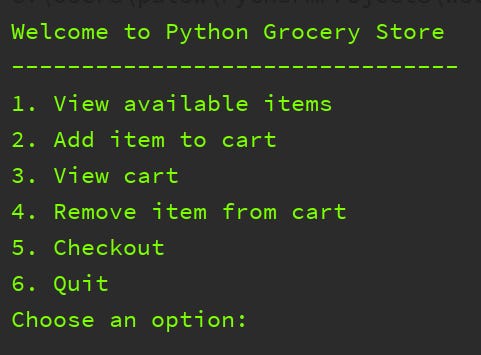
This was the first time loops really made sense to me. The program needed to keep running until the user decided to quit. That “while True” loop wasn’t just code—it was the engine keeping my store open 24/7.
Challenges Along the Way
Here’s where things got interesting.
Cart not updating: At first, when I added apples, nothing changed in the cart. The issue? I wasn’t checking if the item already existed in the dictionary. My fix was to use:

Suddenly, the cart updated properly.
Checkout security: I wanted the checkout to feel authentic, not just pressing “done.” So I added a list of valid keys, like a secret PIN system no one would know until you check the code (yes I know this seems like a big security flaw). If the key matched, the purchase went through; if not, “Invalid Key.” It was simple, but it gave the program personality.
Error handling: I realized quickly that users don’t always type what you expect. Someone might type “BananaZ” or put in letters instead of numbers. Without error handling, the whole program would crash. So I added try/except blocks to catch mistakes and keep things running smoothly. That was a huge moment as now my program wouldn’t break just because of a simple typo.
Seeing It Work
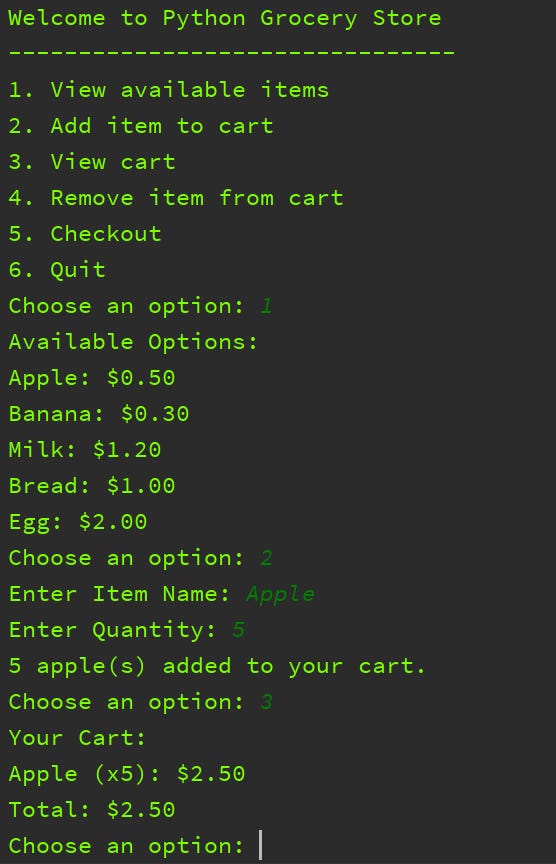
The first time I ran through the full simulation, it felt amazing. I browsed the store, added apples and milk, removed bread, saw my total update in real time, and finally checked out using a valid key.
It wasn’t flashy as it didn’t have graphics, sound effects, or a login system. But it worked. And the satisfaction wasn’t from the code itself, but from the fact that I had gone from knowing random Python basics to actually building something that felt like a real system.
What I Learned
This grocery store simulator taught me more than syntax. It taught me how small coding concepts connect to real-world problems:
Dictionaries aren’t just key-value pairs; they can represent store shelves or carts.
Loops aren’t just practice drills; they can keep a system running for as long as the user needs.
Error handling isn’t optional; it’s what makes a program feel robust.
Most importantly, I learned that the fastest way to stop being bored with programming basics is to build something, even if it’s small, even if it’s imperfect.
I still remember how satisfying it felt pressing “run” and watching my grocery store come alive. It wasn’t just lines of code anymore, it was a tiny world where I was both the store manager and the customer and the great part was I created the whole thing. And that’s when coding finally clicked for me: Python wasn’t just about commands, it was about creating little systems that solve problems.
Next time, maybe I’ll try building a recipe recommender or a budget tracker. But for now, I’ll keep shopping at my very own Python Grocery Store. If you want to check out the code or try out the simulator check out my github repository: GroceryProject.py